Django: Simple Multi Site Architecture
When I first built Simple Routing, I launched a static marketing/landing site at the www subdomain. I later launched the product at the api subdomain. I kept both sites separate, built with different technologies - eleventyjs for the static site, django for the product application. This architecture enabled me to keep separate concerns separate and hack on each site independently. As the product matured, though, I found myself building cross-site features and longing for a unified design. Faced with the choice of synchronizing between the projects or introducing another project (e.g. a shared design system for reference by each), I instead merged the two sites into the django application.
First, I had to prove that I could serve both sites on the same django application. Django comes with basic support for this use case via request.urlconf: changing the urlconf in middleware will route the request via a user-specified urlpatterns. In my case, I created a separate django application (landing) with its own urls.py that would get routed to via middleware:
# ... settings.py

WWW_HOSTNAME = config("WWW_HOSTNAME", default="www.simplerouting.io")

# *.localhost is reserved by RFC 6761
WWW_LOCAL_HOSTNAME = config("WWW_LOCAL_HOSTNAME", default="www.localhost")

HOSTNAME_URLCONF_MAP = {
    WWW_HOSTNAME: "landing.urls",
    WWW_LOCAL_HOSTNAME: "landing.urls",
}

# ... middleware.py

class HostnameURLConfMiddleware:
    def __init__(self, get_response):
        self.get_response = get_response

    def __call__(self, request):
        host = request.get_host().split(":")[0]

        if urlconf := settings.HOSTNAME_URLCONF_MAP.get(host):
            request.urlconf = urlconf

        # fall back to default urlconf
        return self.get_response(request)
where HOSTNAME_URLCONF_MAP allowed me to first test against a unique subdomain (www2), and also powers local development (www.localhost). For my www.localhost local domain, I did have to create a loopback entry in /etc/hosts as OS X does not automatically route .localhost domains.
This worked just fine - I was up and running on both subdomains. I then had to prove that I could match the performance of static site hosting. To do so, I added cache headers to views in my www site, with the following base view class:
@method_decorator(cache_control(public=True, max_age=60 * 60 * 12), name="dispatch")
class LandingPageView(TemplateView):
    pass
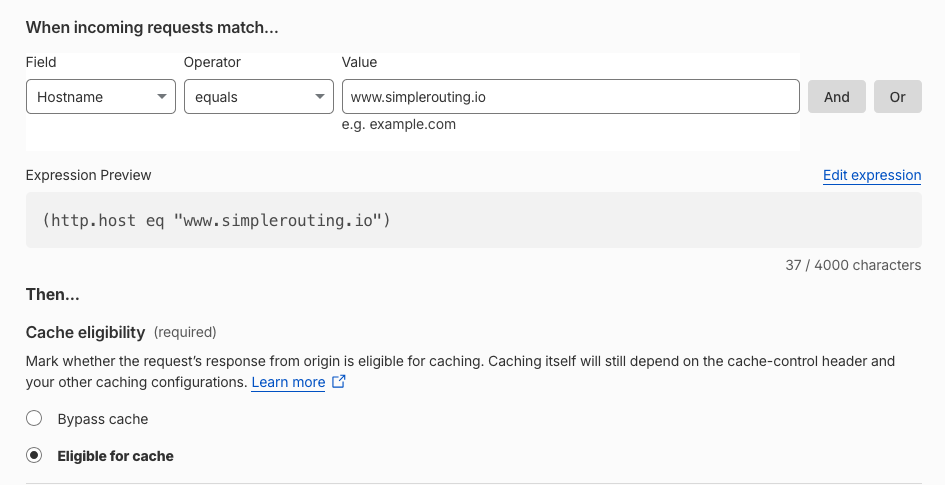
and configured cloudflare to cache only for this subdomain (as I definitely don't want dynamic content cached):
To ensure that content would remain cache-able, I (okay, Claude) added a test to ensure that the Set-Cookie header is not returned for relevant views.
Finally, as with a static site, I added cdn cache busting to the deploy step via the cloudflare api (see previous post on the topic).
Et voilà! I now have one repo built with one technology, serving both a static marketing site at www.simplerouting.io and a dynamic SaaS site at api.simplerouting.io. Excitingly this unlocks unifiying the design system across the sites and improves cross-site development (e.g. maintaining links).